Review Apple
Alcove Review: The MacBook Notch Finally Has a Purpose
Alcove turns the MacBook notch into a polished Dynamic Island-style space for alerts, media, widgets, gestures, and small system moments that make macOS feel more alive.
How this review was made
Alcove is a paid Mac utility. This review focuses on the app’s notch functionality, visual polish, day-to-day usefulness, and value for MacBook users.
The verdict
Alcove
Alcove makes the MacBook notch feel intentional. It is not a must-have productivity tool, but it is a beautifully polished utility that gives macOS a little of the Dynamic Island charm Apple still has not brought to the Mac.
MacBook users who like polished Mac utilities, enjoy Dynamic Island-style interactions, listen to music often, want better visual system feedback, or wish the notch did something useful.
Skip it if you use an external monitor most of the day, dislike animated UI elements, do not have a notched MacBook, or want a productivity hub instead of a visual notch enhancement.
Pros
- Makes the MacBook notch feel useful instead of awkward
- Polished Dynamic Island-style animations
- Good media and system feedback experience
- Customizable HUDs and gestures
- Lock screen widget support
- Native Mac feel
- Fair one-time price
Cons
- More visual polish than deep productivity
- Best on MacBooks with a notch
- May feel unnecessary if you prefer a quieter desktop
- Less compelling if you mostly use external displays
MSRP$14.99
Check current priceThe MacBook notch has always felt like unfinished business.
Apple added it to make room for a better camera and thinner display bezels, which makes sense from a hardware perspective. But from a software perspective, macOS mostly pretends the notch is not there. It hides in the menu bar, interrupts the top edge of the screen, and then just sits there.
Alcove has a much better idea: use it.
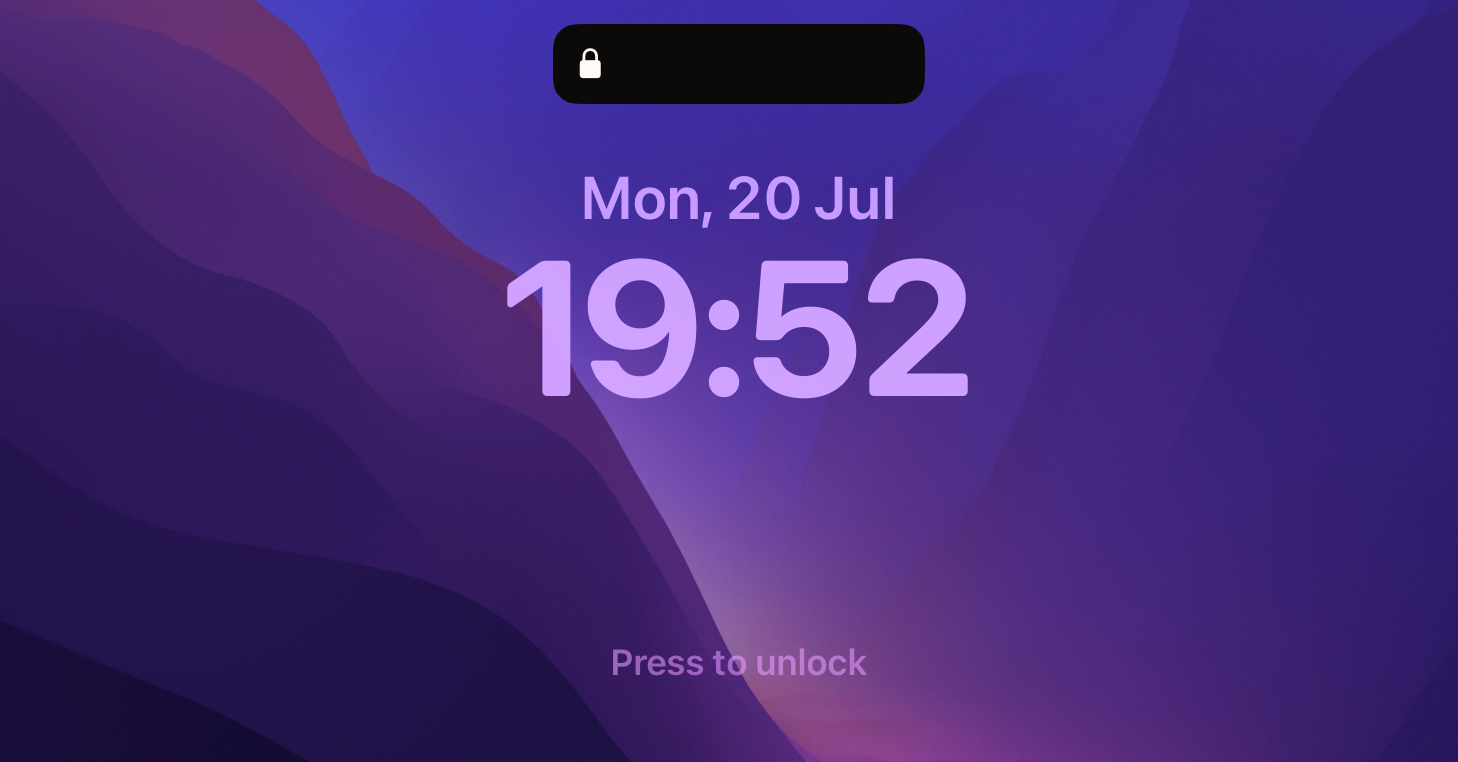
Alcove is a paid Mac app that brings a Dynamic Island-style experience to the MacBook notch. The app’s official pitch is direct: “Dynamic Island for your Mac,” with features like fluid transitions, instant notifications, live activities, swipe gestures, customizable HUDs, lock screen widgets, and a native Mac app experience. It currently lists a $14.99 purchase price on the official site. Alcove
That sounds like a gimmick. Honestly, it should be a gimmick. But Alcove works because it understands the assignment. It does not try to turn the notch into a second Dock, a giant launcher, or a productivity dashboard. Instead, it makes the notch feel like a small, responsive part of the system.
And that is exactly why it works.
The notch becomes part of macOS
The best Mac utilities are the ones that feel obvious after you use them. Alcove lands in that category because it solves a strange visual problem with a surprisingly elegant answer.
The notch is already there. You look near it constantly because it sits between your menu bar items, clock, status icons, and active app menus. Alcove takes that dead zone and gives it motion, context, and personality.
When music is playing, the notch can feel like an active media surface. When a system event happens, Alcove can surface it with a clean animation. When you interact with it, the app responds in a way that feels closer to iPhone’s Dynamic Island than a traditional Mac menu bar utility.
That is the key difference. Alcove is not just hiding the notch. It is embracing it.
The animations are the point
A lot of Mac utilities are judged by how much they can do. Alcove is better judged by how well it disappears when it is not needed and how good it feels when it appears.
The transitions matter. The timing matters. The way the island expands, contracts, reacts, and settles back into place matters. This is not the kind of app where a feature checklist tells the whole story.
If Alcove looked cheap, it would be distracting immediately. A notch app sits in one of the most visually sensitive areas of the display. Bad animation at the top of the screen would get annoying fast.
Alcove avoids that. Its biggest strength is polish. It feels intentional, not like a floating widget pretending to be system UI.
What Alcove does well
Alcove’s most useful trick is that it makes small system moments feel more visible without making them feel heavier.
Media controls are the obvious win. Having playback feel connected to the notch makes sense, especially if you are already used to the Dynamic Island on iPhone. It is glanceable, compact, and easy to understand.
The HUD customization is another strong point. macOS still has parts of the interface that feel weirdly plain or outdated, especially around system feedback. Alcove gives those moments a more modern visual language.
Live activities and lock screen widgets also help the app feel less like decoration and more like something woven into the Mac experience. The notch becomes a place where things can happen.
That said, Alcove is not trying to be a full productivity hub. If you want file shelves, app launching, window management, or deep workflow automation, this is not that kind of utility. Alcove is more about presence, glanceability, and polish.
Paid, but not hard to justify
At $14.99, Alcove is priced like a premium Mac utility, but not an expensive one. Alcove
The value question comes down to how much you care about the feel of your Mac.
If you only judge apps by raw productivity, Alcove may seem unnecessary. It is not going to replace Raycast, CleanShot X, DockDoor Pro, or a real window manager. It will not suddenly save you hours every week.
But not every good Mac app has to be a spreadsheet of efficiency gains. Some utilities make the computer feel better. Alcove is one of those.
It gives the notch a reason to exist. It makes system feedback more pleasant. It adds personality without turning macOS into a theme park. For people who enjoy well-crafted Mac software, that is worth paying for.
The downside: it depends on taste
The main reason to skip Alcove is simple: you might not want your notch to do anything.
Some people want their Mac interface as quiet as possible. For them, even polished animation can become visual noise. Alcove is restrained, but it is still adding movement and interaction to a part of the screen that was previously passive.
There is also the broader category question. Notch utilities are still a little niche. If you are using an external monitor most of the day, or if your Mac does not have a notch, Alcove obviously becomes less compelling.
And if you want the notch to become a productivity tool rather than a visual system layer, a different app may make more sense.
Verdict
Alcove is one of those apps that makes Apple’s own software feel strangely incomplete.
The MacBook notch should have had some kind of native function by now. Apple already proved the concept on iPhone with Dynamic Island, yet macOS still treats the notch like something to work around instead of something to use.
Alcove fills that gap with taste. It is polished, animated, customizable, and focused. It does not try to turn the notch into everything. It just makes the top of your MacBook feel more alive.
If you like Mac utilities that add personality without getting in the way, Alcove is easy to recommend. It is not essential for everyone, but for the right kind of Mac user, it makes the notch feel less like a compromise and more like a feature.
Score: 8.5/10

Reviewed by
Bryan
Independent technology coverage focused on useful context, real-world experience, and honest recommendations.