Review Apple
Cotypist: AI Autocomplete That Works Everywhere on Your Mac
Cotypist predicts what you are about to write directly inside Mac apps, using local AI to accelerate email, documents, messages, and prompts without sending your words to the cloud.

How this review was made
This review was produced independently. Cotypist’s published documentation was used to verify its features, pricing, compatibility, permissions, and privacy practices. The developer had no editorial control over the review.
The verdict
Cotypist Review: AI Autocomplete That Works Everywhere on Your Mac
Cotypist brings genuinely useful AI autocomplete to the places where Mac users already write. Its local processing, word-by-word controls, and cross-app design are excellent ideas, but inconsistent compatibility, hardware demands, and expensive subscriptions prevent it from feeling essential just yet.
People who write large volumes of email, documents, support replies, notes, and AI prompts; slow typists; multilingual writers; and users who want AI assistance without sending their writing to the cloud.
Skip it if you use an Intel Mac, rarely write long-form text, need guaranteed support in every application, do not want to grant Accessibility permission, or dislike recurring subscriptions for locally processed software.
Pros
- Word-by-word acceptance keeps the writer in control
- Core AI processing runs locally and works offline
- Personalization data is optional, encrypted, and locally stored
- Password fields are protected by macOS
- Screen Recording and clipboard context remain optional
- Global and per-app writing instructions
- Multilingual suggestions and code-switching support
- Potentially valuable accessibility benefits
- Free tier and card-free 30-day Pro trial
Cons
- Paid subscriptions are relatively expensive
- Accessibility permission is mandatory
- Screen Recording is recommended for the best predictions
- Compatibility remains inconsistent across certain applications
- Apple Silicon and macOS 14 or newer are required
- Uses approximately 1GB–2.5GB of memory while active
- Local inference can affect MacBook battery life
- Anonymous diagnostics are enabled by default
- Longer suggestions can drift from the writer’s intention
- The free plan’s 100-word daily allowance can disappear quickly
MSRP$72
Check current priceMost AI writing tools interrupt your work before they improve it.
You stop writing, open a chatbot, explain what you need, wait for an answer, copy the result, paste it into another app, and then edit the response until it sounds like something you would actually say.
Cotypist takes a much quieter approach.
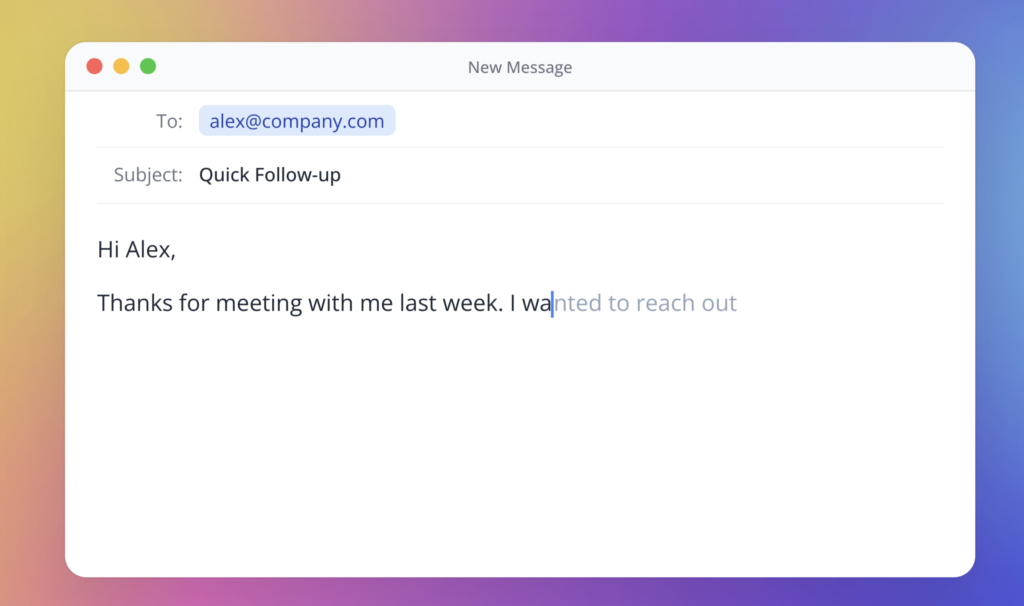
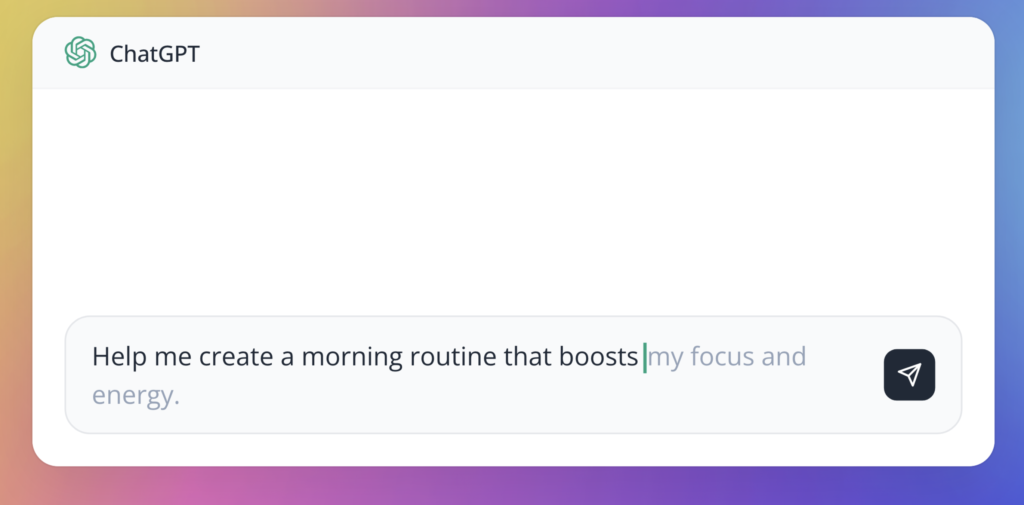
Instead of trying to write an entire article or email for you, Cotypist predicts the next few words directly inside the app you are already using. Start writing a sentence and a faint completion appears after your cursor. If the prediction is useful, press Tab to accept the next word. Press it repeatedly to move through the suggestion, or use a separate shortcut to accept the entire completion.
If Cotypist guesses incorrectly, you do not need to dismiss a dialog or choose another response. Just continue typing. The suggestion updates after every keystroke and often moves closer to your intended sentence after you enter another letter or two.
It is essentially an AI-powered version of autocomplete, expanded from one application to almost everywhere you write on your Mac.
After spending time with it, I think Cotypist is pretty cool. It is fast, unusually private, and capable of becoming genuinely useful. It also remains an evolving product with compatibility gaps, hardware demands, and subscription pricing that will be difficult for some people to justify.
For now, I am giving it a 7.5 out of 10.
A very different kind of AI writing tool
Cotypist is not a replacement for ChatGPT, Claude, or a full writing assistant.
It does not wait for you to describe a task and then generate a finished document. Its role is smaller and, in some ways, more practical: it helps you reach the end of the sentence already forming in your head.
That distinction is important.
Generative AI often wants to take control of the entire writing process. Cotypist is designed to leave control with the person at the keyboard. It predicts likely words based on what you have written, the text surrounding the cursor, your optional writing instructions, and—if you enable personalization—patterns in your previous writing.
The result still requires your judgment. You decide whether to accept one word, several words, or none of the suggestion.
That word-by-word acceptance is one of the app’s smartest decisions. Longer AI completions frequently begin well and then drift away from the point you intended to make. Cotypist lets you salvage the useful opening without committing to the entire prediction.
This makes the app feel more like a capable co-typist than an automated author.
How Cotypist works
Once installed and configured, Cotypist runs in the background and watches the active text field through macOS Accessibility features.
As you type, its local language model examines the available context and generates a continuation. That suggestion appears inline after the cursor. Cotypist recommends pressing Tab once to accept the next word, then continuing to type normally. If its prediction is completely accurate, you can accept the full completion with a configurable shortcut.
The basic rhythm looks like this:
- Begin typing normally.
- Wait for the inline prediction to appear.
- Press
Tabto accept the next suggested word. - Press
Tabagain if the next word still matches your intent. - Continue typing whenever the suggestion begins to drift.
- Press
Escwhen you want Cotypist to stay quiet temporarily.
The suggestion continually updates as you add letters. This is much smoother than cycling through a menu of alternative sentences.
Cotypist can also suggest emoji, work across multiple languages, and support code-switching within a sentence. Paid plans add longer completion controls, complete autocorrection, writing instructions, and stronger personalization. Pro adds larger models, per-app instructions, optional clipboard awareness, and experimental Labs features such as mid-line completions and alternative-word choices. Cotypist’s official tips guide explains the complete interaction model.
It works in far more than one editor
The biggest benefit is system-wide availability.
Cotypist supports common browsers, Apple Mail, Outlook, Microsoft Word, Pages, Notes, Notion, Obsidian, Messages, WhatsApp, and many other Mac applications. It can also help complete prompts written for ChatGPT and AI coding agents.
This makes Cotypist fundamentally different from autocomplete features built into a single editor. You do not have to maintain one writing workflow in Mail, another in Notes, and another in your browser. The same suggestion system follows you throughout macOS.
Compatibility is not universal, however.
Google Docs requires its Accessibility options to be enabled. Arc and Dia require additional configuration for true inline suggestions. Slack is currently listed as partially supported. Thunderbird, OneNote, Google Slides, Zed, Sublime Text, Warp, and several other applications are not supported. VS Code, Cursor, and Windsurf support their sidebar chats but not autocomplete inside the main code editor. Virtual machines and remote desktops are also outside Cotypist’s reach. Cotypist publishes a detailed compatibility list, which is worth checking before subscribing.
That inconsistency is one reason my current score stops at 7.5. When Cotypist works well, it feels natural. When an application exposes its text differently, the experience can require configuration, use a separate mirrored suggestion window, or fail completely.
Personalization can make it sound more like you
Cotypist can gradually adjust its suggestions to match your vocabulary, names, phrasing, and writing style.
Importantly, input collection for personalization is disabled by default. If you enable it, Cotypist can save qualifying writing sessions locally and build a profile of your language patterns. You can then control how strongly that profile influences future suggestions.
Plus subscribers can add global custom writing instructions describing their occupation, tone, audience, and preferred writing style. Pro subscribers can create different instructions for individual apps and websites.
That could be useful if you want concise, casual suggestions in Messages but more formal language in Mail. Someone who writes in multiple languages could also configure different behavior for different workspaces.
The app even lets you disable collection for specific applications or browser domains. That is important because there are places where personalization may be useful and others where storing any input—even locally—would be unnecessary.
The longer Cotypist understands your patterns, the more useful it should theoretically become. But personalization still does not replace judgment. Suggested text may be grammatically plausible while being factually wrong, too generic, or simply different from what you meant.
Privacy is one of Cotypist’s strongest features
An application that reads what you type deserves more scrutiny than an ordinary menu-bar utility.
Cotypist’s answer is to perform its language-model processing directly on your Mac. According to the developer, writing is not sent to an AI server, placed into cloud logs, or used as remote training data. The core autocomplete system continues to work offline.
Its default model is from Google’s Gemma family and runs locally through llama.cpp. Different plans and hardware configurations offer access to several Gemma and Qwen models, but the central privacy architecture remains the same: inference takes place on the Mac.
Optional personalization data is also stored locally in an encrypted database. Its encryption key is held in macOS Keychain, and users can delete the stored data globally or separately for individual apps and domains. Cotypist’s personalization documentation explains these controls.
That is a considerably better privacy model than transmitting every developing sentence to a remote service.
There is one qualification worth mentioning. Cotypist sends anonymous feature-usage information and crash reports by default. The developer says this telemetry never contains writing, clipboard data, or recognized screen content. Crash reports are processed through Sentry, while anonymous usage counts go to Google BigQuery, with both using Frankfurt-based infrastructure. This sharing can be disabled under Settings → General → Privacy, followed by restarting the app. Cotypist’s privacy overview provides the complete disclosure.
For maximum privacy, I would disable anonymous reporting, leave clipboard awareness off unless it is genuinely helpful, and carefully choose where personalization data may be collected.
Understanding the permissions
Cotypist needs significant macOS permissions because of what it does.
Accessibility access is required. It lets Cotypist read the active text field and insert accepted completions. Without it, system-wide autocomplete cannot function.
Apple automatically prevents Accessibility clients from reading secure password fields. However, if a website’s “show password” button converts a password into ordinary visible text, it should be treated like any other text displayed on the screen.
Screen Recording is recommended but optional. Cotypist uses it to examine nearby visible text through on-device recognition. This can help it understand an email thread, identify names on the screen, or avoid repeating existing information. The developer states that these screenshots are processed in real time and are neither stored nor uploaded.
If you deny Screen Recording access, Cotypist still works, but its predictions rely on less surrounding context and may be more generic.
Clipboard access is optional and disabled by default. Pro users can let Cotypist consider recently copied information when constructing a suggestion. According to its privacy documentation, clipboard context is read in memory and not permanently stored or transmitted.
These permissions are logically connected to the app’s functionality, but that does not mean users should approve them without thought. Cotypist is distributed as a directly downloaded, Apple-notarized DMG, yet it remains software with broad access to active writing contexts. Only download it from the official Cotypist website, and disable any feature you do not need.
Security and privacy are not exactly the same
Cotypist has a thoughtful privacy design, but it is helpful to distinguish privacy claims from an independent security audit.
Local processing greatly reduces the exposure created by continuously sending text to cloud servers. Encryption protects stored personalization data, and Keychain separates the database from its encryption key. Apple notarization provides another meaningful layer of software-distribution protection.
Those are all positives.
However, Cotypist still needs powerful Accessibility access. Screen Recording can expose visible information while enabled, even though Cotypist says that processing remains local. Users ultimately place trust in the developer’s implementation and published policy.
I have not seen a public independent security audit of the application. That does not imply the app is unsafe; it simply means “runs locally” should not be interpreted as an absolute security guarantee.
For legal, medical, financial, corporate, or otherwise sensitive work, I would keep personalization collection disabled for those applications and consider declining Screen Recording access entirely.
Performance and hardware requirements
Keeping an AI model on the device has a cost.
Cotypist requires an Apple Silicon Mac running macOS 14 or later. Intel Macs are not supported. The developer recommends at least an M1 Pro or M2-class system with 16GB of unified memory for the best experience.
While active, the app reportedly uses approximately 400MB of memory, depending on the selected model and configuration. Larger Pro models may produce sharper predictions on powerful hardware, but they are not automatically the best choice. A model that cannot keep up with your typing can make Cotypist feel worse, even if it is technically more capable.
The app attempts to recommend a suitable model for each Mac. I would follow that recommendation before chasing the biggest model in the catalog.
Battery consumption is another consideration. Local AI inference requires energy, and the developer acknowledges that Cotypist can be power-intensive. On a desktop Mac that may not matter. On a MacBook away from a charger, it is something to monitor.
The real benefits
Cotypist’s value is not found in one spectacular AI response. It comes from hundreds of small moments.
A few words accepted in an email do not feel transformative. Multiply those saved keystrokes across messages, documents, support replies, prompts, and notes, and the time can begin to add up.
The clearest benefits are:
- Less repetitive typing
- Fewer interruptions and context switches
- Faster email and document composition
- Consistent assistance across many Mac apps
- Word-by-word control over AI suggestions
- Local processing for sensitive writing
- Multilingual and in-sentence language support
- Potential accessibility benefits for people who type slowly, one-handed, or with physical difficulty
It can be especially effective for predictable writing. Customer-support replies, technical documentation, recurring correspondence, and structured business communication give the model enough patterns to complete useful fragments.
It is less convincing during short chats or highly creative writing where the next sentence is not predictable. Cotypist extends an existing thought; it does not necessarily create the thought for you.
Pricing is the biggest obstacle
Every installation begins with a 30-day Pro trial requiring no credit card. Afterward, users can return to the Free tier or choose Plus or Pro.
The current annual pricing is:
- Free: 100 accepted completion words per day
- Plus: $72 per year, equivalent to $6 per month, for unlimited completions on one Mac
- Pro: $108 per year, equivalent to $9 per month, for the complete feature set on up to three personal Macs
Month-to-month pricing is $8 for Plus and $12 for Pro. Prices and taxes can vary by region. The official pricing comparison contains the current plan details.
The free plan is generous enough to determine whether Cotypist fits your workflow, but 100 completed words can disappear quickly during a productive writing session.
Plus is probably the sensible tier for someone who writes every day on one Mac. It includes unlimited completions, full autocorrect, configurable suggestion length, global writing instructions, and a useful selection of models.
Pro adds the largest model catalog, stronger personalization, three-Mac support, clipboard awareness, per-app instructions, mid-line completions, and word alternatives.
The subscription is harder to justify than the product itself. Cotypist performs its AI processing locally with open models, so the recurring fee can feel expensive compared with a traditional one-time Mac utility. The developer is charging for continued development and the difficult system-wide integration rather than per-request cloud computing.
Whether that is worthwhile depends almost entirely on how much you write. If it saves a professional writer or support agent meaningful time every day, the price may be easy to defend. For an occasional writer, the free tier is probably enough.
What I would like to see improved
Cotypist already has a compelling foundation, but it is not yet an essential recommendation for everyone.
Broader and more consistent app compatibility would make the biggest difference. A system-wide writing tool needs to feel reliably system-wide. Having to remember which applications require setup, partial support, or a separate suggestion presentation weakens the magic.
I would also like to see continued improvements to prediction accuracy and resource efficiency. Suggestions are most helpful when they arrive instantly and remain close to the writer’s intent. A delayed or overly confident prediction can create more mental friction than it removes.
Finally, the subscription price creates high expectations. At $72 or $108 every year, Cotypist must keep improving enough to remain indispensable. A less expensive tier, family option, or one-time license could make it appealing to a much wider group of Mac users.
Final verdict
Cotypist represents a version of AI that I find genuinely interesting.
It is not trying to replace the writer. It is not asking you to hand over an entire assignment. It does not require another browser tab or another prompt. It simply watches for the next predictable part of your thought and offers to help you type it.
When it works, the experience is fast, natural, and occasionally a little uncanny. The word-by-word acceptance system keeps you in control, while local inference gives Cotypist one of the better privacy models available in an AI writing product.
It is also still a product with caveats. Compatibility varies, the local model consumes noticeable system resources, sensitive permissions are required, and the paid plans are expensive enough to demand real daily value.
That is why my score is 7.5 out of 10—for now.
Cotypist is not perfect, but it is original, thoughtfully built, and pretty cool. If its compatibility, efficiency, and overall polish continue to improve, that score could move considerably higher.

Reviewed by
Bryan
Independent technology coverage focused on useful context, real-world experience, and honest recommendations.