Review Apple
Superwhisper Review: The Mac App That Finally Made Me Want to Dictate
I have never been much of a dictation person. Talking to a computer often feels slower than typing once you account for mistakes, awkward punctuation and the cleanup afterwards.
How this review was made
This is an independent review based on my own experience with Superwhisper. The company had no editorial input and did not pay for this coverage.
The verdict
Superwhisper
Superwhisper is one of the best voice-to-text utilities available for the Mac. It is fast, accurate and works almost anywhere you can place a cursor. Its combination of local transcription, AI-powered cleanup and customizable modes makes it especially valuable for writers, professionals and anyone who thinks faster than they type.
Writers, content creators, developers, heavy email users, people who work with AI tools and anyone who prefers speaking ideas before editing them.
You rarely write on your Mac, feel uncomfortable dictating aloud or only need occasional basic voice input that Apple’s built-in dictation can already handle.
Pros
- Fast and impressively accurate transcription
- Works across virtually every Mac app
- AI cleanup turns rough speech into polished writing
- Local processing offers excellent privacy
- Custom modes, vocabulary and replacements
- Useful for emails, writing, meetings and AI prompts
- Generous free version
- One Pro license covers multiple platforms
Cons
- Settings can feel overwhelming at first
- Larger local models require significant storage
- Custom modes and vocabulary do not fully sync between devices
- Best offline performance requires an Apple Silicon Mac
- Lifetime license is a sizeable upfront purchase
MSRP$8.49
Check current priceSuperwhisper is the first Mac app that has genuinely changed my mind.
The idea is wonderfully simple: press a shortcut, speak naturally and release it. A moment later, clean text appears wherever your cursor happens to be—an email, a note, Messages, a browser or a prompt in an AI app.
It feels less like opening a transcription tool and more like giving your Mac a new input method.
More than transcription
Superwhisper does two jobs. First, a speech-recognition model turns your voice into text. Then, if you choose, a language model cleans up and reformats the transcript.
That second step is where the magic happens. You can ramble, change direction halfway through a sentence and speak in the shorthand that makes sense inside your own head. Superwhisper removes filler, fixes punctuation and turns the result into something you might actually send.
It does not simply transcribe what you said. It does an impressive job of preserving what you meant.
Different modes tailor the output for messages, notes, emails and other types of writing. Super Mode can use the active app, selected text or clipboard as context. You can also create custom modes with your own instructions, so a quick message, polished email and detailed AI prompt do not all come out sounding the same.
It works wherever you work
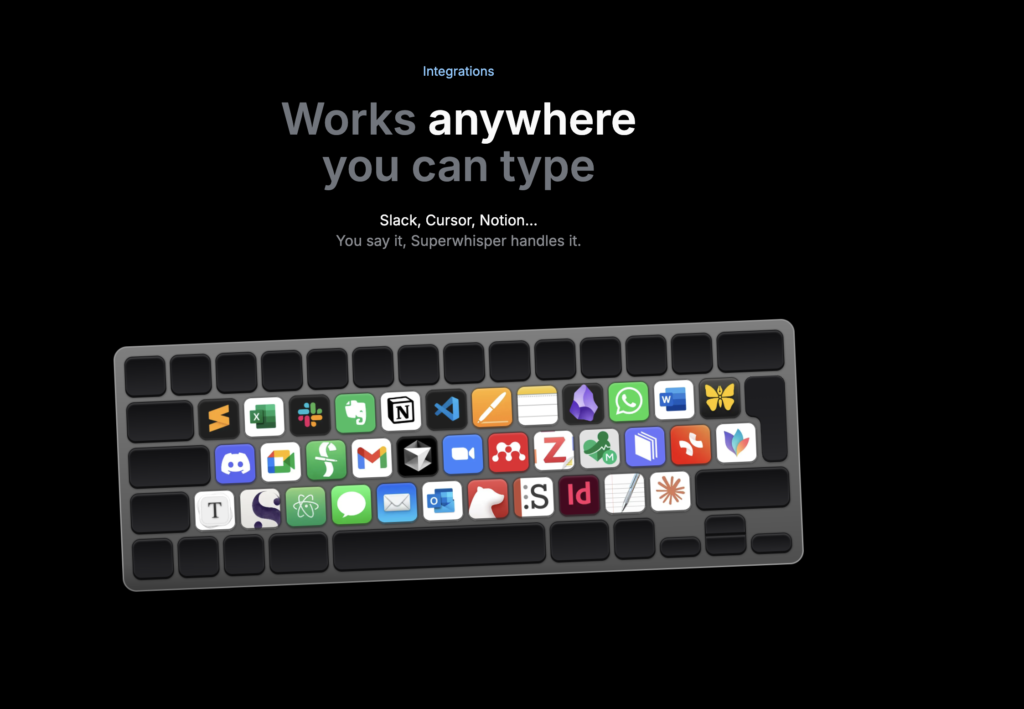
Superwhisper works in virtually any Mac app. There is no separate compose window to visit and no transcript to copy and paste. Put the cursor where you want the words, speak and carry on.
I have found it particularly useful for:
- replying to emails without turning every response into a project;
- getting a rough first draft out before overthinking it;
- creating longer and more specific AI prompts;
- capturing ideas while they still have some energy;
- transcribing meetings, voice memos and existing media files.
It supports more than 100 languages, can translate speech into English and lets you add custom vocabulary for names, acronyms and specialist terms. Automatic replacements can also fix words the app consistently misunderstands.
Local or cloud—your choice
Privacy is one of Superwhisper’s strongest arguments on the Mac. Its on-device speech models can run entirely on Apple Silicon, without an internet connection or microphone audio leaving the computer.
Pro users can also run local language models for the cleanup stage, creating an entirely offline workflow. Cloud models remain available when you want maximum speed or accuracy, and advanced users can bring their own AI API keys.
You do not need to understand every model to start using the app. However, the flexibility is there if you care about balancing speed, accuracy, storage and privacy.
Apple Silicon is the ideal platform. Intel Macs are supported, although cloud models are recommended because the larger offline models do not run as well on older hardware.
A few rough edges
Superwhisper is powerful enough that the settings can initially feel like a lot. Models, modes, prompts and shortcuts become useful once you know what you want, but expect to spend a little time experimenting.
Larger local models can also consume several gigabytes of storage. Custom modes and vocabulary are currently stored separately on each device rather than syncing automatically.
Fortunately, once you have chosen a shortcut and configured a couple of modes, the app largely disappears—which is exactly what a good Mac utility should do.
Pricing
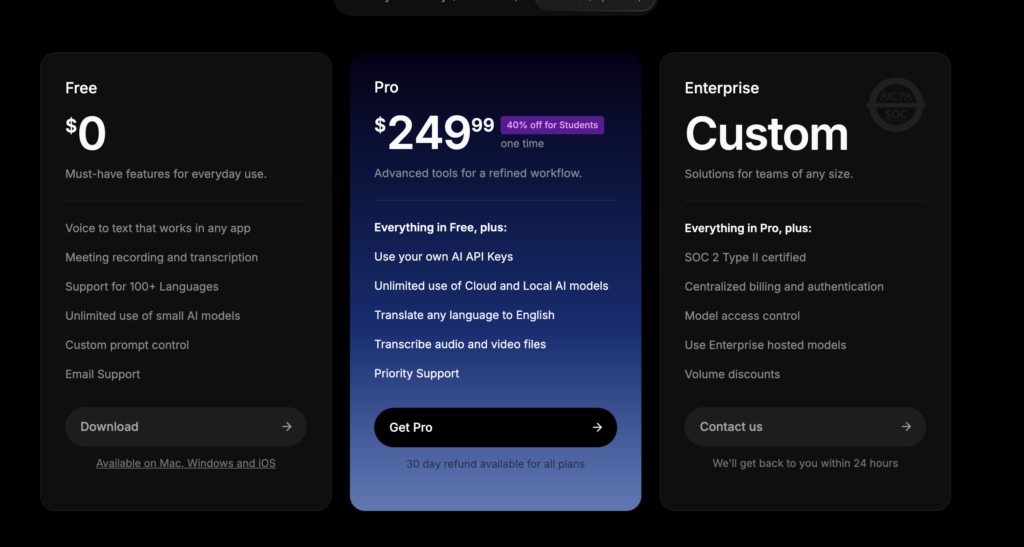
Superwhisper has a useful free tier that includes voice-to-text in any app, meeting transcription, support for more than 100 languages and unlimited access to its smaller models.
At the time of writing, Pro costs $8.49 per month, $84.99 per year or $249.99 for a lifetime license. It unlocks the full selection of local and cloud models, custom modes, AI processing, custom vocabulary, speaker separation and file transcription.
One Pro license covers Mac, Windows, iPhone and iPad, including unlimited Mac and Windows computers.
Final thoughts
Superwhisper is one of those rare utilities that changes how I use my Mac rather than adding another destination to it. It is fast, remarkably accurate and available at the exact moment words are needed.
The appeal is not that it replaces the keyboard. It removes the keyboard as a bottleneck.
Sometimes typing is still the right tool. Other times, an idea arrives faster than your fingers can follow. Superwhisper provides a practical way to capture that thought, clean it up and put it to work.
If you write frequently, answer too much email, use AI tools or simply think better out loud, download the free version and give it a few days. It is an easy app to underestimate—and a surprisingly difficult one to give up.
Rating: 9/10

Reviewed by
Bryan
Independent technology coverage focused on useful context, real-world experience, and honest recommendations.